Frequently Asked Questions
- How can I make a new subscription ?
- Where can I find your agents ?
- How can I change my password
- How can I pay my subscription ?
- How do you connect to the Internet ?
- When can I pay my subscription ?
- Error 691 what does it mean?
- I can't receive my email, always requires my password
- How can I make my email configuration
- What does Server means?
- I have more than one access from difference places, how can I leave a copy in server to receive it from the another station?
- Can I let my friend use my subscription?
- "The modem is not responding" what does it mean?
- "There is no dial tone" what does it mean?
- When I am testing my modem from the diagnostic, the computer is
finding the modem but when I am dialing to the Internet I can hear a
continuous peep and not accessing me to the Internet, what does it mean?
You can make a new subscription with Zaytona.com by one of our agents in the
cities we are available, or you can call us at +970-9-2381642 and we will
appreciated to make a new subscription, or you can fulfill the application form
at our web site.
Zaytona Soft is covering Nablus City and Tulkarem, our agent in Tulkarem is
Afaq for Computers +970-9-2673766 (personal in charge: Jafar or Jamal Al-Tibi),
but in Nablus we have many agents.
Recently, just call us at +970-9-2381642 and we will change your password,
but we are doing hard to do this facility in hand.
We are appreciated to visit us at our office location sight, or you can just
call us and we will send our employee to collect the payment from your side. or
you can deposit the money at our bank account:
Jordan Gulf Bank - Nablus branch
A/C 3011451 (multiple currencies)
Zaytona Soft is connecting through Paltel.com the backbone of Palestine by
leased line.
Usually, Zaytona Soft is getting their subscription fees in advance.
It means one of the following reasons:
1- Your user name or your password is wrong.
2- Your subscription is expired.
It means one of the following reasons:
1- Your password changed by another.
2- Your subscription was expired.
3- Your subscription was disabled because there is another station is running.
4- Your email configuration is incorrect.
If you are using Microsoft Outlook Express you have to follow these steps:
1- From the menu bar chose tools
2- From tools chose accounts.

3- From accounts chose mail folder
4- From the Mail folder chose Add mail.
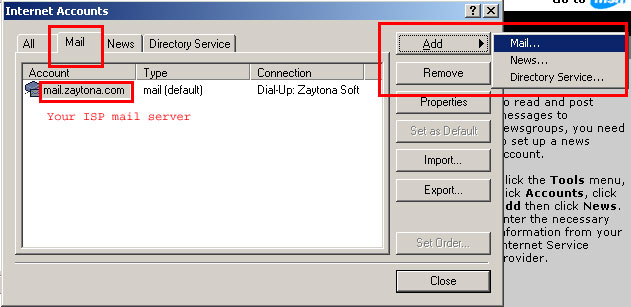
Then you have to follow the instructions with examples.
It means your ISP mail server, that enables you send and receive your email freely.

See the fig bellow:

NO, because he can use your email account (send & receive) and you don't know what & where he is sending emails using your name and your organization.
It means that your computer is not recognized your modem, you should reinstall the modem with its own driver software.
It means that your modem is not logged by the phone line, you should test the following:
1- If the phone line is working properly.
2- If your phone cable is not crashed or damaged.
3- Your modem is working properly.
It means that your modem is damaged.
Author information goes here.
Copyright © 2001 zaytona.com All rights reserved.
Revised:
03/04/03.