Changing Dial Up Networking Settings to use Planet's New Modem Number for Win95/98
In order to use the the New PRI System you should change some configuration,
the procedure is very simple, just follow the following steps:
-
First go to My Computer and then go to Dial Up Networking

-
Highlight the icon called PLANET or Planet connection and press
with the right mouse botton. It will give you some options, here
choose Properties.
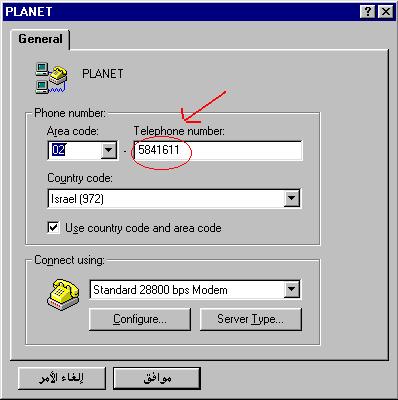
At this point you will have a window, as shown on the figure below, you
will find the old phone number that you've been using. Please change this
number to the new number that is 5841611, after changing the phone
number press on the Configure... botton located at the bottom left
of the same screen.
-
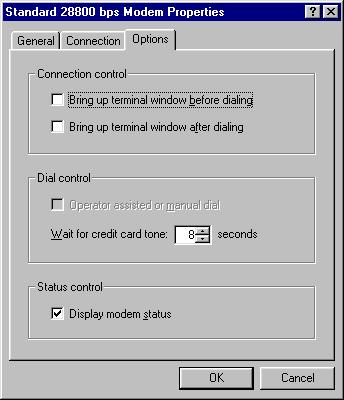
After cliking on the configure botton, it will take you to another screen
as shown below. Press on the Options tab. And take out any marked
option in the Connection Control section, which means that neither bring up terminal window before/ nor after dialing is supposed to be marked. Exactly as you see in the following figure.
-
Press on the OK button, and another OK on the next screen.
Congratulations, you have successfully changed your settings and now you should be ready to try out the new fast technology.